Tip alertsVenmo · Cash App · PayPal

Get tippedon stream.

Monetized or not.

Let your fans support you directly and still get their moment on stream. We make that happen.

7-day trial · Card required.
Standard price after trial: $8/month or $60/year plus applicable tax, before any applied promotion. Renews automatically until canceled.

Stream highlight · Inde Ella

A full alert first. Then it stays.

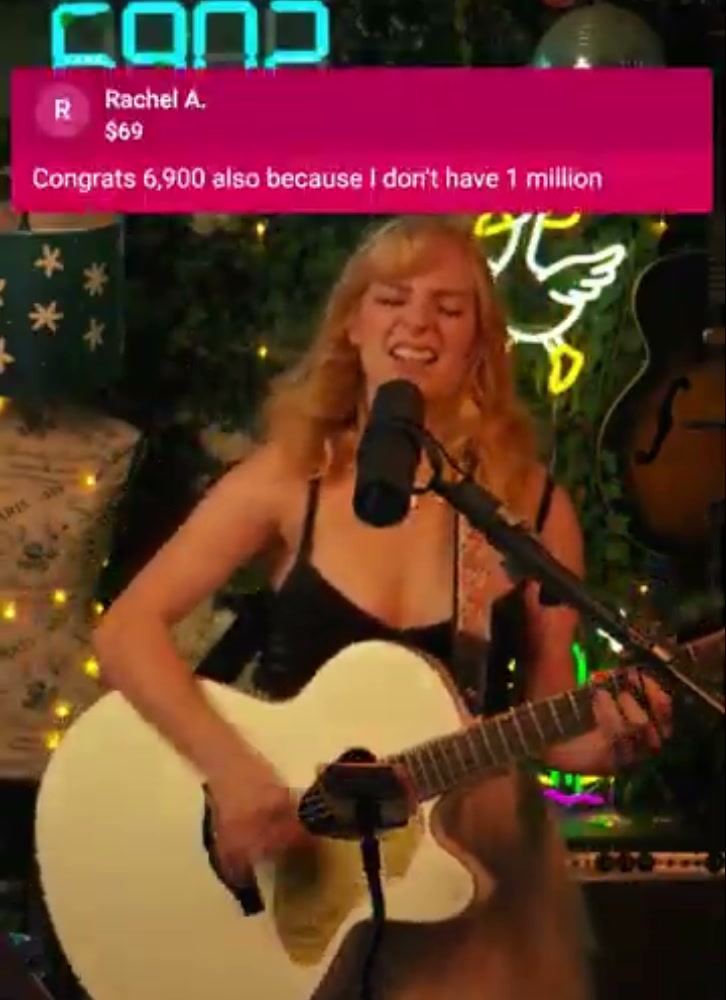
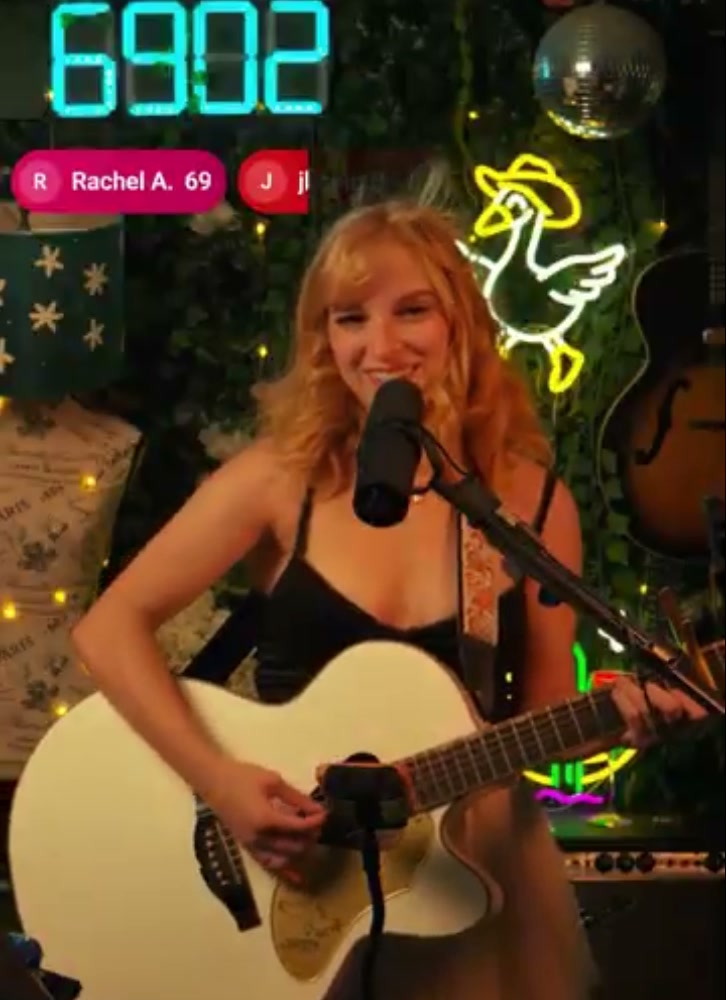
Each tip plays as a full alert, then condenses into a compact tip your viewers keep seeing.

01 Full alert

Inde Ella singing and playing guitar on stream, with a $69 tip alert from Rachel A. visible above her.

02 Condensed tip

Later in the same stream, Rachel A.’s $69 tip appears as a small persistent pill above Inde Ella as she plays guitar.
One $69 tip. Full alert → condensed tip.From Inde Ella’s recorded stream · Shared with permission

Try it out

Send a sample tip.
See it light up.

Tap an amount to see the full alert become a compact tip. It’s a demo—no payment, account or setup needed.

Who it’s for

Monetized or not, your tips belong on screen.

Not monetized yet

Get tipped before you’re monetized.

You don’t need Twitch Affiliate or YouTube Partner status to use Display Tips. Connect the Gmail inbox that receives your Venmo, Cash App or PayPal receipts and show tips on stream.

  • ✓Gmail that gets your payment receipts
  • ✓A streaming app with a browser source
  • ×Affiliate or Partner statusNot needed

YouTube theme $5 example

Twitch theme $5 example

Actual Display Tips themes · Sample name, amount and message.

Already monetized · YouTube

Skip the Super Chat cut.

YouTube pays creators 70% of net Super Chat revenue. With direct tips to your Venmo, Cash App or PayPal account, Display Tips takes no percentage: just a flat subscription. Your payment provider’s fees still apply.

Source: YouTube partner earnings overview ↗

Already monetized · Twitch

Tips without buying Bits.

Viewers tip your payment account directly, with no Bits purchase in between. Twitch pays participating creators 1¢ per Bit used to Cheer; viewer purchase prices vary. Display Tips takes no percentage, and payment-provider fees still apply.

Source: Twitch Partner Program overview ↗

Make their support go further

Same on-screen recognition. Less lost to platform cuts.

Show Venmo, Cash App and PayPal tips on stream, so viewers can support you directly and still get their moment on screen.

One streamer’s experience
Viewers began switching from YouTube Super Chats to direct tips after seeing those tips appear on stream, wanting more of their money to reach the creator.

Customer-reported experience. Results vary. Display Tips subscription and payment-provider fees apply.

Read the customer story ↗

How it works

Three steps. Then it’s automatic.

  1. Display Tips 7-day trial$8/monthCard required · plus tax
    01

    Start your trial

    Create your account and choose a plan. Eligible new accounts get 7 days free, with a card required. Enter eligible promotion codes in monthly checkout. Your plan renews automatically until you cancel; standard billing resumes after any temporary discount ends.

  2. Gmail Read-only

    Google asks you to “View your email messages and settings.”

    Connect Gmail
    02

    Connect Gmail

    Allow read-only access to the Gmail account that receives your Venmo, Cash App or PayPal payment emails. Choose which services to listen for.

  3. YOUR OVERLAY LINK
    displaytips.com/overlay/…Copy
    Streaming app → Add browser / web source
    03

    Add one overlay link

    Paste your private overlay link into a browser or web source in your streaming app. It sits next to anything else in your scene. See compatible apps. Set up OBS Studio.

Then alerts appear automatically when supported payment emails arrive in your Gmail.

Pricing

One flat price.

Flat subscription. No Display Tips percentage cut. Your payment provider’s fees still apply.

Viewers pay you on Venmo, Cash App or PayPal like they already do. Display Tips doesn’t process or hold payments. It reads the payment email and shows the alert.

Monthly

$8

per month

Yearly

$60

per year · about $5/month

  • PayPal, Venmo, and Cash App receipt alerts
  • One private overlay link for your streaming app
  • All themes, live preview and test tips
  • No Display Tips percentage cut
Start 7-day trial

7-day trial · Card required.
Standard price after trial: $8/month or $60/year plus applicable tax, before any applied promotion.
Renews automatically until canceled.

Annual plan billed $60 annually. Save $36 a year.
Promotion codes are accepted on monthly checkout only. Review your total and billing schedule in Stripe before subscribing.
Signup alone does not start a paid subscription.

Fast alerts

Almost instant.
Right on stream.

When a supported Venmo, Cash App or PayPal confirmation email arrives in Gmail, Display Tips turns it into an on-screen alert almost instantly. Give your viewer their moment while you’re still in the moment.

Timing depends on payment-email delivery and processing. Email and network delays can affect when an alert appears.

Thank them while you’re live

Tips appear automatically, so you can acknowledge your viewers without stopping to check your phone.

One overlay. Three services.

Venmo, Cash App and PayPal tips share one place on screen, with a full alert that condenses into a compact tip.

FAQ

Straight answers.

Which streaming apps can I use?

Display Tips uses a private browser overlay link. These apps support the browser or web sources it needs; follow the linked guide for your app:

Paste your private overlay link into the source’s URL field. Other apps may also work if they support live web overlays with transparent backgrounds. Features vary by app and version, so check a test tip in your scene before going live.

Will it work on my streaming platform?

The overlay is added in your streaming app, so it appears in the video you send to Twitch, YouTube, Kick, Facebook or another destination. You need an app with browser or web overlay support; your streaming destination’s monetization status doesn’t matter.

What can Display Tips see in my Gmail?

It connects with Google’s read-only Gmail permission: “View your email messages and settings.” It checks message details to find payment emails and reads full email content for the payment services you turn on. It can’t send, delete or change email. Read our privacy policy.

How fast do alerts show up?

Alerts appear almost instantly after a supported payment confirmation email reaches Gmail and is processed. Timing depends on payment-email and network delivery; delays can occur, so there is no fixed delivery-time guarantee.

Does Display Tips take a cut of my tips?

No. Display Tips isn’t involved in the transaction. It only displays it for you.

What name shows on the alert?

The payer’s first name and last initial, like Maya R., or their handle. Alerts can also show the amount and payer’s message.

Do I need to be monetized?

No. Display Tips doesn’t depend on Twitch Affiliate, YouTube Partner or any platform’s monetization program. You need a Gmail account receiving supported payment receipts and a streaming app with browser or web overlay support. A card is required for the 7-day trial.

Monetized or not.

Get tipped on stream.

Start 7-day trial

7-day trial · Card required.
Standard price after trial: $8/month or $60/year plus applicable tax, before any applied promotion.
Renews automatically until canceled.

Available to eligible new subscribers.