CUSTOMER-REPORTED EXPERIENCE
Direct support. Still part of the show.
One creator reported that viewers began switching from YouTube Super Chats to direct tips after seeing those tips appear on stream.
The reason they gave was simple: they wanted more of their money to reach the creator. Display Tips let those direct tips receive on-screen recognition alongside the rest of the stream.
How direct support becomes an alert
The payment and the on-screen acknowledgment are separate parts of the workflow. A viewer sends a tip through a supported payment service. When its supported incoming receipt reaches the creator’s connected Gmail inbox, Display Tips processes it and shows an alert through the private browser overlay.
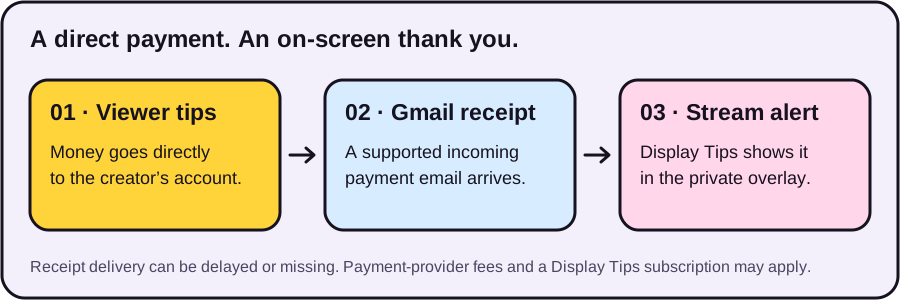
The overlay is part of the video produced by the streaming app. Its job is to acknowledge support visually, with the payer’s abbreviated name or handle, amount and message when available. Display Tips does not process the payment or control payment-provider fees.
What the experience illustrates
A creator can offer a direct payment option while still giving that support a moment on screen. Viewers can choose the payment route that suits them.
Display Tips uses a flat subscription rather than a percentage of tips. The creator still needs to account for the subscription and any payment-provider fees. See pricing and trial terms before choosing a plan.
Check the fit for your stream
- Start with your receipts. Check the Venmo, Cash App or PayPal guide. Only supported incoming receipt formats are recognized.
- Understand the inbox permission. Connecting Gmail is a separate, read-only grant. Read the privacy policy and connect only an inbox you own or are authorized to use.
- Test your scene off air. Follow the OBS guide to add the private URL and check a sample alert. A test tip broadcasts to every connected overlay.
- Check a real receipt separately. A display test does not prove that email delivery or a specific payment receipt works. Provider email and network delivery may be delayed or missing.
No Twitch Affiliate or YouTube Partner status is required to use Display Tips. Your streaming app needs browser-overlay support, and the connected Gmail inbox needs supported payment receipts. Your payment account remains the transaction record.
See how the setup works
Start with the guide for your payment service and streaming app.
Browse setup guides ↗Questions about compatibility? Contact support. Learn who operates Display Tips.