DISPLAY TIPS · SETUP GUIDE
Show Venmo tips on your stream.
Turn supported incoming Venmo payment emails into tip alerts in OBS or another streaming app with a browser source.
Viewers can tip your Venmo account directly and see their support acknowledged on stream. Display Tips reads supported receipts from the Gmail inbox you connect and displays the alert through your private overlay. It does not receive the payment or manage your Venmo account.
Before you start
- A Venmo account receiving incoming payment emails in Gmail.
- A Display Tips trial or subscription and permission to connect that Gmail inbox.
- OBS Studio or another app that supports a browser or web source.
You do not need Twitch Affiliate or YouTube Partner status. The alert becomes part of the video you broadcast, so it can appear on your streaming destination without a platform-specific tipping feature.
Connect Venmo receipts
- Create your Display Tips account and choose your plan.
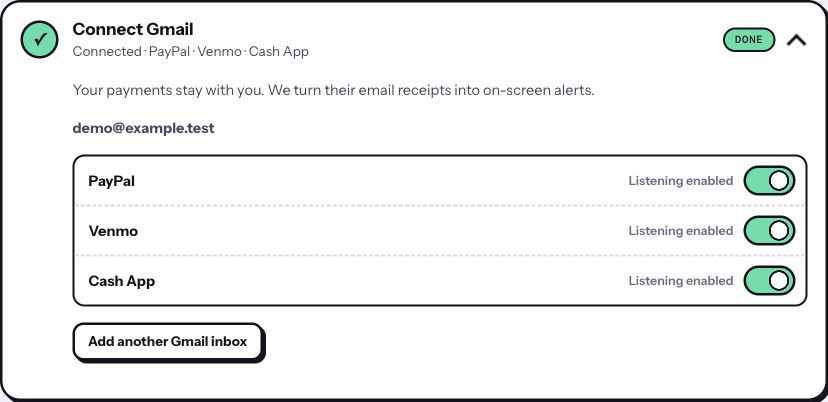
- Open Connect Gmail in the dashboard. Choose Venmo for the inbox that receives your payment confirmations, then complete the separate Google permission step.
- Check that Venmo shows Listening enabled. If you use more than one connected inbox, check the service selection on the inbox receiving those receipts.
- Open Add one overlay link, copy your private URL and follow the OBS browser-source setup guide.
Check the alert before you go live
Use Test your alert while you are off air to check the layout. A test tip checks the overlay display; it does not verify that a real Venmo payment email will be recognized. For an end-to-end check, confirm a new, genuine incoming payment and its official receipt after Venmo listening is enabled. Existing emails do not automatically replay as new tips.
Venmo tip missing from the overlay?
- No receipt in Gmail: check the email address and notification settings on your Venmo account. A phone notification or Venmo transaction alone does not give this email-based overlay a receipt to read.
- Receipt arrived, but no alert: check that the correct Gmail inbox is connected and Venmo listening is enabled. Reconnect if the dashboard asks you to.
- Test alerts work, real alerts do not: confirm the email describes money received, rather than a payment you sent or a request for money. Only supported incoming receipt formats are recognized.
- Nothing appears in OBS: check source visibility, layer order and the copied private link using the OBS troubleshooting steps.
Receipt delivery can be delayed or missing. Your Venmo account remains the transaction record; an overlay alert is not proof of payment. If a supported receipt is missed, contact support without sharing your private overlay URL.
What viewers see, and what stays private
Alerts can show an abbreviated payer name or handle, amount and message. Review your appearance settings and a test alert before broadcasting. Your private overlay link is a viewing credential: put it in your streaming app, not in chat, your stream description or a public screenshot.
Google grants broad, read-only Gmail access when you connect an inbox. Display Tips checks message details to find supported payment receipts and fetches full content for the payment services you enable. It cannot send, delete or change email. Read the privacy policy before connecting.
Put your tips on screen
Connect supported payment receipts, add your overlay and test your scene.
Start your seven-day trial ↗Card required. $8/month or $60/year after the eligible trial, plus applicable tax. Renews automatically until canceled.